How to Check Second Hand Laptop Before Buying
How to check second hand laptop is one of the most important skills you can learn before spending your hard-earned money on a used PC. A second-hand laptop can save you thousands of rupees, but if you skip proper testing, you might end up paying double in repairs.
In this detailed guide, I will show you five practical tests you must run before buying any used laptop or PC. These checks are simple, beginner-friendly, and highly effective.
Table of Contents
Why You Must Know How to Check Second Hand Laptop
Buying a used laptop is not wrong. In fact, many professionals and students choose refurbished devices to save money. But you must inspect:
- Display quality
- Hard disk condition
- CPU and GPU performance
- Battery health
- Physical damage
If you skip these checks, you risk buying a slow or damaged system.
For official Windows troubleshooting, you can refer to Microsoft Support (Do Follow):
https://support.microsoft.com
If you want to understand laptop hardware basics, you can check Intel’s official guide (DoFollow):
https://www.intel.com
Test 1 – How to Check Second Hand Laptop Display
The display is one of the most expensive parts of a laptop. Replacing it can cost a lot.
Step-by-step display test:
- Open Notepad
- Maximize it to full screen
- Change background colors (white, black, red, blue if possible)
- Carefully inspect the screen
What to look for:
- Dead pixels (tiny black or white dots)
- Lines across the screen
- Yellow patches
- Flickering
If you see multiple dots or bright spots, avoid the laptop.
You can also use free online pixel test tools like EIZO Monitor Test (DoFollow):
https://www.eizo.be/monitor-test/
Test 2 – How to Check Second Hand Laptop Hard Disk Health
The hard disk stores all data. If it fails, you lose everything.
Steps to check hard disk:
- Press Windows key
- Open Microsoft Store
- Search CrystalDiskInfo
- Install and open it
CrystalDiskInfo shows health status clearly.
What is safe?
- Health above 90% – Excellent
- 80% to 90% – Acceptable
- Below 70% – Avoid
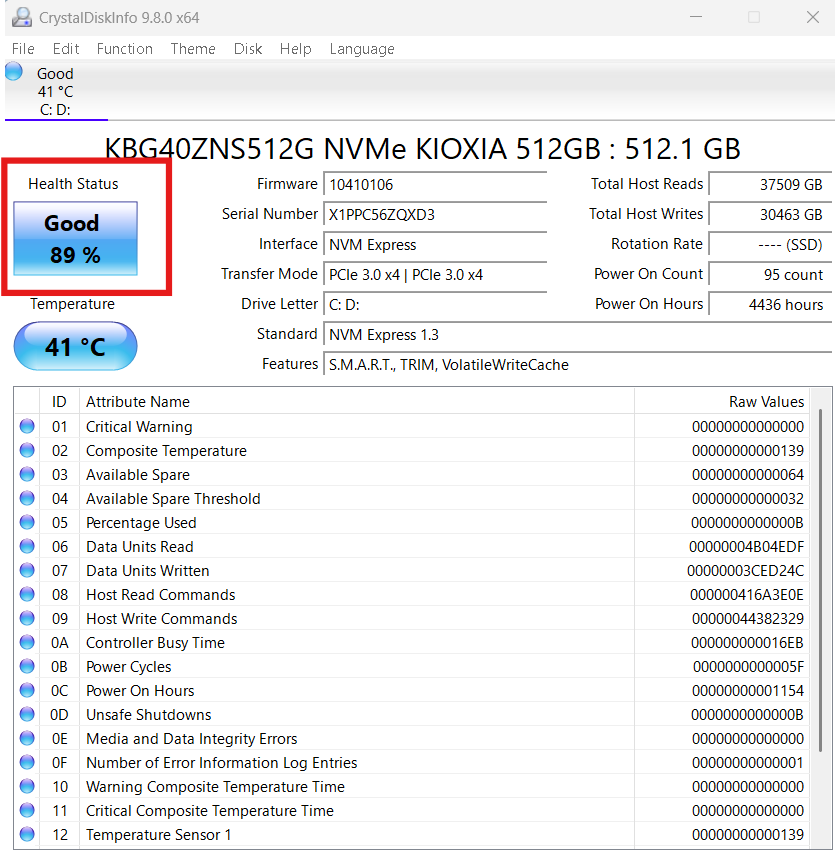
If the health shows below 70%, do not buy the laptop.
Test 3 – How to Check Second Hand Laptop CPU and GPU Performance
The processor and graphics card are the brain of the laptop.
Steps:
- Press Ctrl + Shift + Esc
- Open Task Manager
- Click on Performance
- Run heavy software (YouTube 4K video or editing software)
What to check:
- CPU usage consistently above 80% at idle is bad
- GPU overheating or sudden spikes
- System lag or freezing
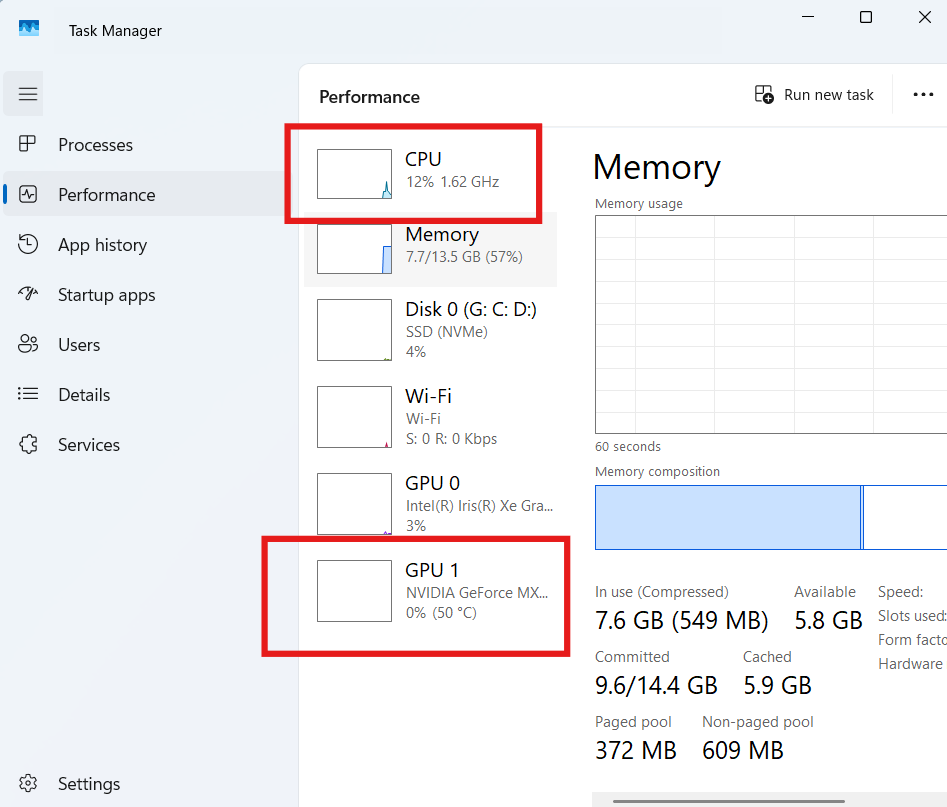
High usage during normal tasks means performance issues.
For stress testing tools, you can refer to CPUID (DoFollow):
https://www.cpuid.com
Test 4 – How to Check Second Hand Laptop RAM Condition
RAM is also important test of laptops.
Steps:
- Open RUN Command
- Type: mdsched
- Press Enter
- Click on Restart now and check for the problem
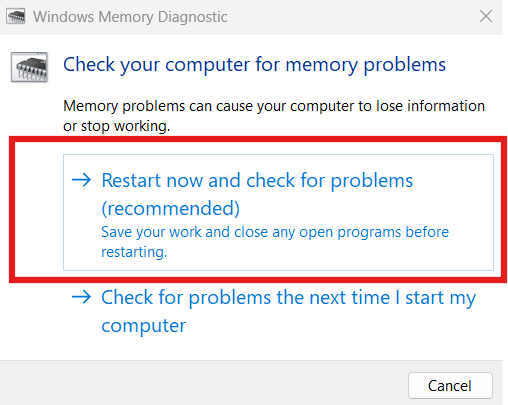
If problem shows in status then ask for heavy discount.
Test 5 – How to Check Second Hand Laptop Battery Health
Battery replacement is common in used laptops.
Steps:
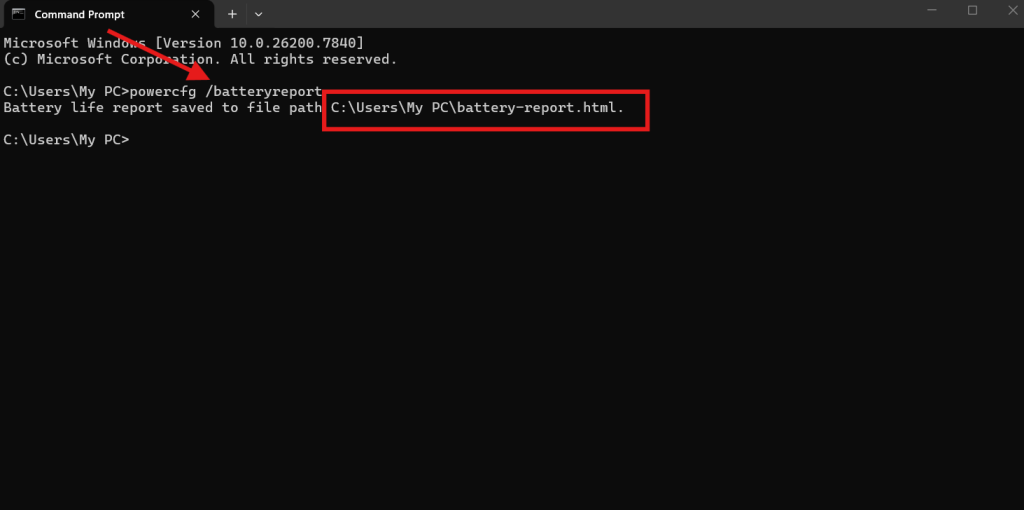
- Open Command Prompt (CMD)
- Type: powercfg /batteryreport
- Press Enter
- Copy the file path
- Open it in browser
What to check:
Compare:
- Design Capacity
- Full Charge Capacity
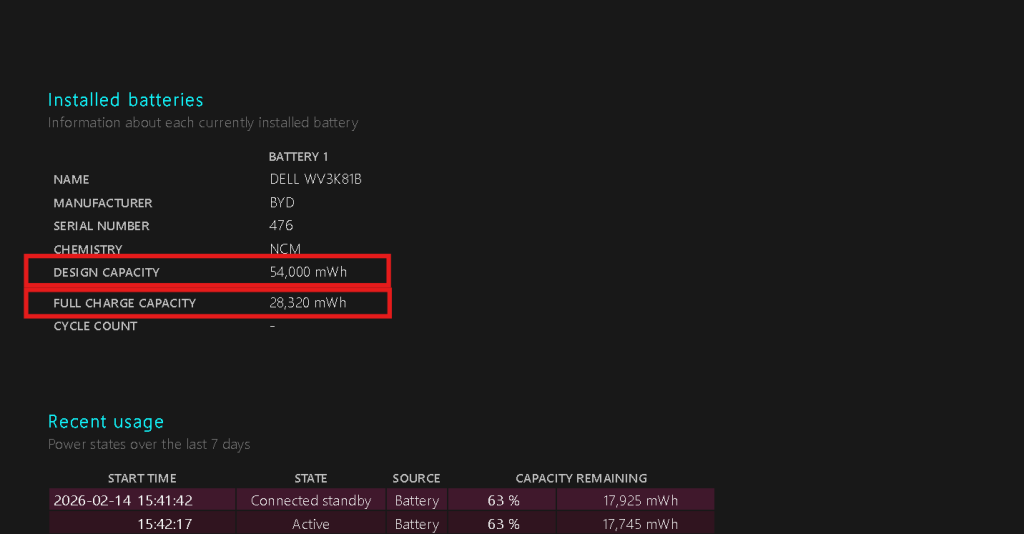
If Full Charge Capacity is less than 50% of Design Capacity, the battery needs replacement.
Additional Physical Inspection Tips
When learning how to check second hand laptop, do not ignore physical condition.
Check:
- Keyboard keys working properly
- Touchpad smoothness
- USB ports working
- Charging port condition
- Webcam functionality
- Speaker clarity
Also check if:
- Laptop overheats quickly
- Fan makes loud noise
- Screws are missing
Bonus Checklist Before Final Payment
Before paying:
- Check Windows activation status
- Verify original charger
- Ask for original bill if available
- Check serial number on manufacturer website
- Ensure no BIOS password
For Windows activation check, go to:
Settings → System → Activation
You can check these too
Laptop Not Detecting WiFi Network Windows 10 Is Fixable
How Do I Increase Virtual Memory in Windows PC Without Causing Problems
DNS Server Not Responding on Windows PC Can Be Fixed Quickly
Common Mistakes People Make
- Buying based on appearance only
- Ignoring battery condition
- Not checking storage health
- Trusting seller without testing
- Skipping stress test
When you properly understand how to check second hand laptop, you avoid these costly mistakes.
Final Thoughts on How to Check Second Hand Laptop
Buying a used laptop is smart when done correctly. If you follow these five tests carefully:
- Display test
- Hard disk health check
- CPU and GPU performance test
- Battery health report
- Physical inspection
You dramatically reduce risk.
Always test before payment. Never rush.
Learning how to check second hand laptop protects your investment and ensures you get value for money.
FAQs
How to check second hand laptop battery health quickly?
Use Command Prompt and type powercfg /batteryreport. Compare design and full charge capacity.
How to check second hand laptop hard disk health?
Install CrystalDiskInfo and check health percentage. Avoid below 70%.
Is 80% CPU usage normal while testing?
During heavy tasks yes, but at idle no. Constant high usage indicates problems.
How to check second hand laptop for dead pixels?
Open Notepad in full screen with white background and inspect for dots or lines.
Should I buy a laptop with 60% battery health?
Only if you are ready to replace the battery.

The lesson was so helpful and I want you to teach or direct me where can I learn to troubleshoot PC network and security.
Thanks a lot for your guidance.
Thanks you keep watching